Loading your planner…
Just a simple productivity tool.
Tried the apps but keep going back to pen and paper? Use Simple Productivity Tool to get things done without the overwhelm.
Simply get things done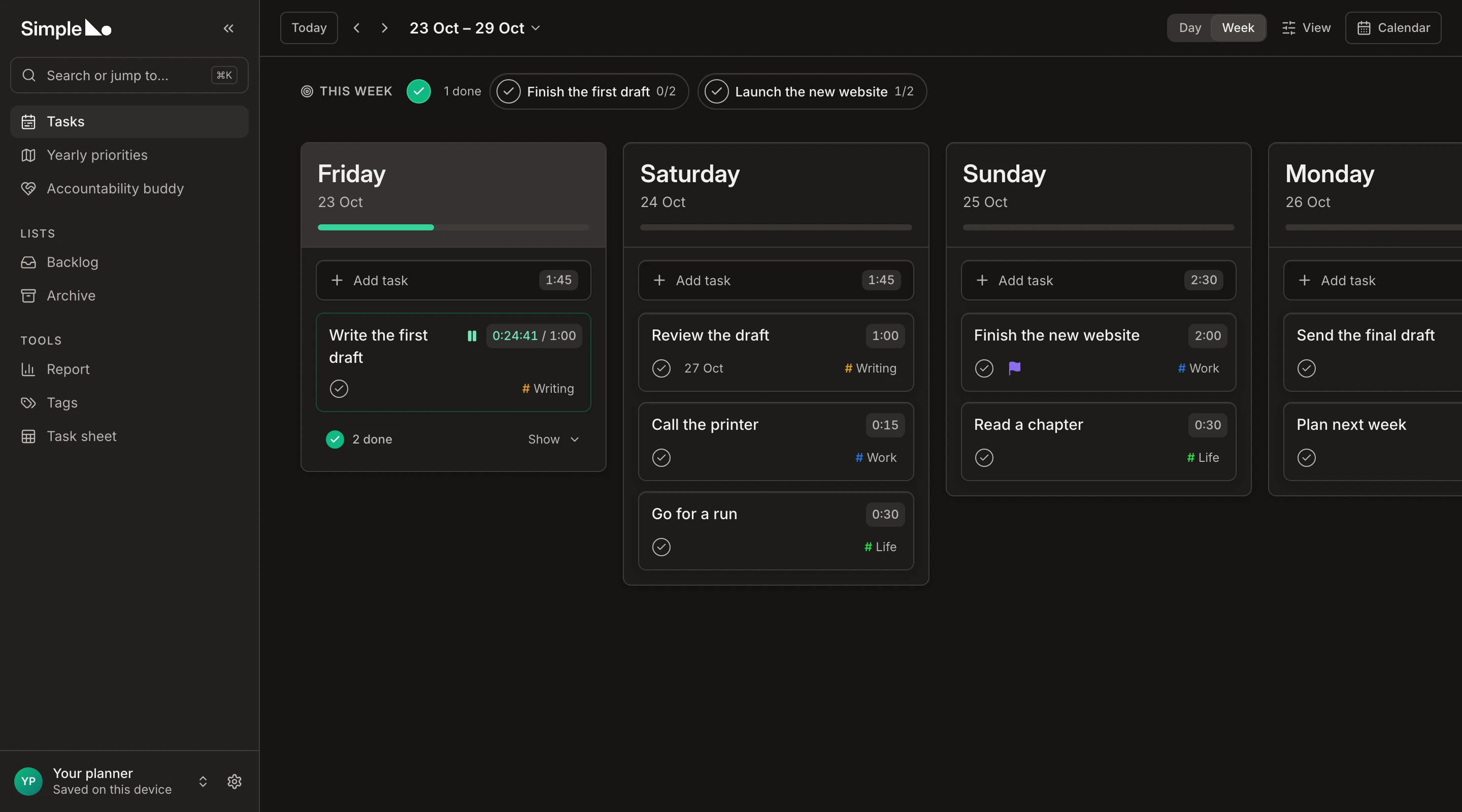
Integrates with Google Calendar, Outlook and Apple Calendar.

Working with others? Share a tag, assign tasks, and see who has finished their part.
Simple pricing.
14 days free. Full access. Your own pace.
$1.90 / week
14 days free (then billed $98.80 annually).Save 24% compared with monthly billing. Weekly amount shown for comparison.
Keep it simple.
Plan your priorities, track your time, and work at your own pace. No weekly commitment.
$0 today. Card required. Your paid subscription starts automatically when the 14-day trial ends and renews annually. Cancel before the trial ends to avoid being charged. One free trial per person.
Start my 14-day free trialCommon user questions.
Different question? Email hello@simpleproductivitytool.com.
What makes Simple Productivity Tool different?
Simple Productivity Tool stays simple on purpose. Many planners have lots of unnecessary features, which makes planning your day feel like yet another job. Simple feels quick like pen and paper, with a short task list for the next few days and a handful of priorities for the year.
It just adds what’s necessary. Prioritization, a task timer, reporting on where your time went, sync with your calendar, and optional accountability with an accountability buddy.
Can I use Simple Productivity Tool with a team?
Yes, you can use Simple Productivity Tool with a team. Simple allows you to share work based on tags, invite people by email, and track time together. Every user keeps their own private planner with both personal and shared tags. Tags can be used to mark tasks, weekly priorities, or yearly priorities. Each person has their own subscription, with the same 14-day free trial.
Is there an app for desktop or mobile?Coming soon
Apps for macOS, Windows, Linux, iOS and Android are on the way. Until then, Simple runs in any modern browser on your computer, phone or tablet. Your planner stays in sync between the different devices.
Can I use Simple Productivity Tool with AI?Coming soon
Yes, you’ll be able to use Simple Productivity Tool with AI. We’re building an MCP server, so AI assistants that support MCP, such as Claude and ChatGPT can work with your planner, pick tasks, work on them and update them. AI tools will only see your planner and tasks when you connect them, and only see what you allow. Simple never uses your data to train AI models. What assistants read from your planner then falls under your account and privacy settings with the AI company, so check that training is turned off there, if you want to prevent training.
Who can see my planner?
You can see your planner. Teammates see the tags you share with them, accountability buddies see the goals you share. Your calendar always stays private. We don’t sell your data or use it to train AI models. Usage analytics and ad measurement only run if you agree to them.
You can export your data or delete your account at any time in Settings. The privacy policy lists the providers we use and where they process data. Questions about GDPR, your other rights or a data processing agreement (DPA, or AVV in German) for your business? Email hello@simpleproductivitytool.com.
Does Simple Productivity Tool work with calendars?
Yes, Simple Productivity Tool works with the major calendar tools. It let’s you connect Google Calendar, Outlook or Apple iCloud to see your meetings next to your tasks. Calendar time blocks you plan in Simple can go back to the calendar you choose with synchronization. Your calendar always stays private, even inside shared tags.
Could I build this app myself instead of paying for it?
You could try to build Simple Productivity Tool yourself. And if you enjoy building your own tools, it might be an interesting challenge. A basic to-do list takes an afternoon with AI. Getting it good enough, so it’s great to use day to day takes way longer. If a tool exactly like ours existed, we’d rather have paid for it than spend the time to build it ourselves.
Can I cancel anytime?
Yes. Cancel in Settings, or cancel without signing in. Cancel during the 14-day trial and you won’t be charged.
Where can I give feedback?
You can give feedback by clicking the button below. Tell us what works, what doesn’t, or what you’d like to see built.